
Appium
An open-source tool for automating mobile applications on iOS and Android platforms
What is Appium?
Appium is an open-source tool that lets you write automated tests for mobile applications.
What makes Appium special is its flexibility. Let's say you're building an app for both iPhone and Android. Without Appium, you might need to write completely different test code for each platform. With Appium, you write your tests once, and they work on both platforms with minimal changes.
Appium supports multiple programming languages. Whether you're comfortable with JavaScript, Python, Java, Ruby, or C#, you can write tests in the language you already know. You don't need to learn a new, specialized programming language.
Behind the scenes, it translates your test commands into the specific instructions that iOS and Android understand. For iOS, it uses Apple's XCUITest framework. For Android, it uses Google's UiAutomator2. But you don't need to worry about these details as Appium handles the translation for you.
Appium Evolution
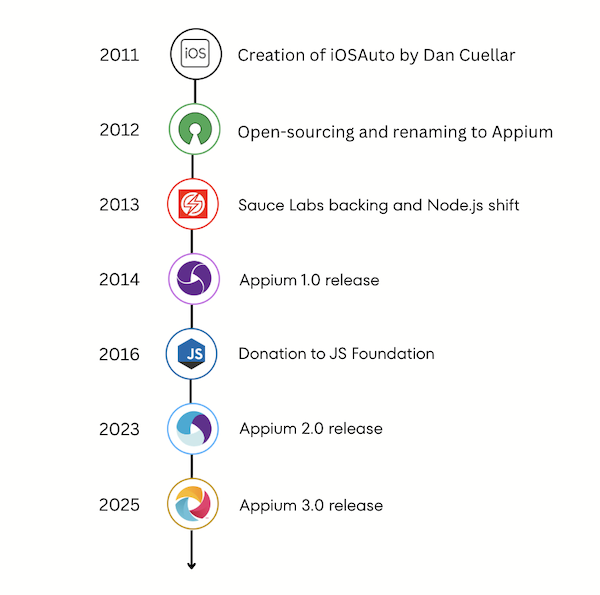
Appium has a rich history spanning over a decade, having been implemented in three different programming languages and evolving under the direction of various individuals and organisations since 2012.
Early Development and Inspiration (2011–2012)
Appium was created in 2011 by Dan Cuellar to address slow iOS test cycles and limitations of existing automation tools. Initially called iOSAuto, it allowed real-time test execution using a Selenium-style syntax. After open-sourcing in 2012 and adding WebDriver support, it was renamed Appium, often described as “Selenium for Apps.”
Sauce Labs and the Shift to Node.js (2013)
In January 2013, Sauce Labs fully backed Appium, initiating a “rebirth” using Node.js to make the framework more accessible and community-friendly. Jonathan Lipps became project lead, and early Android and Selendroid support established Appium as the first truly cross-platform automation tool. The project debuted at the Google Test Automation Conference 2013 and exceeded 1,000 commits by year’s end.
Major Milestones and Architectural Changes
- Appium 1.0 (May 2014): This release marked a significant milestone, leading Appium to become the most popular open-source cross-platform mobile automation framework.
- Architectural Rewriting: Complete rewrite in modern JavaScript to simplify creating Appium drivers, enabling contributions from Microsoft (Windows desktop automation) and Youi.tv.
- Appium to the People (Late 2016): Sauce Labs donated Appium to the JS Foundation (later part of the OpenJS Foundation), securing its long-term open-source stewardship as an Impact Project.
- Appium 2.0 (2023): This release introduced an entirely revamped architecture, shifting the focus to Appium as an ecosystem rather than an all-in-one project. This change enabled the ability for anyone to develop and share their own Appium extensions (drivers and plugins), leading to third-party extensions for Flutter, Windows, and more. A sponsorship program was launched to reward contributors.
- Appium 3.0 (2025): This update was smaller than Appium 2, focusing on removing deprecated code and updating compatibility for modern ecosystems, reflecting the fact that primary feature development had largely moved to individual drivers and plugins since Appium 2.
Appium Architecture
Appium 3.0 uses a modular, plugin-driven architecture where most capabilities live outside the core server. When a test starts, Appium creates a session—a temporary, stateful connection between your test code and a target device or emulator. This session tracks essential context such as the application under test, the selected device, and any configured capabilities or settings.
To keep this complexity manageable and extensible, Appium is organized into four primary components, each with a clearly defined responsibility:
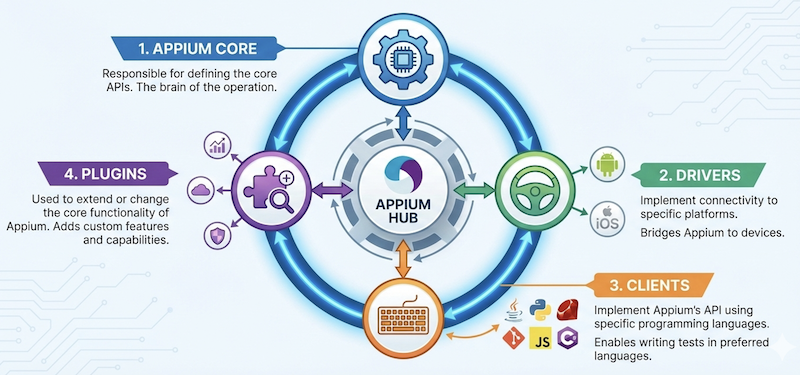
1. Appium Core
Appium Core is the central Node.js server responsible for:
- Implementing the W3C WebDriver protocol
- Managing session lifecycle
- Routing commands to the correct driver
- Loading and coordinating plugins
Key characteristics in Appium 3.0:
- Minimal surface area
- No platform-specific logic
- Backward compatibility improvements
- Removal of deprecated APIs introduced before Appium 2
Appium Core does not know how to automate iOS, Android, or any other platform—it only knows how to delegate.
2. Drivers
Drivers are independent Node.js packages that implement automation for a specific platform or technology.
Examples:
appium-xcuitest-driver→ iOSappium-uiautomator2-driver→ Androidappium-flutter-driver→ Flutter appsappium-windows-driver→ Windows desktop apps
Responsibilities:
- Translate WebDriver commands into platform-specific automation calls
- Manage platform sessions and capabilities
- Communicate with underlying automation engines (XCUITest, UIAutomator2, WinAppDriver, etc.)
In Appium 3.0:
- Drivers evolve independently of core
- Version compatibility is explicitly defined
- Feature innovation primarily happens at the driver level
3. Plugins
Plugins allow cross-cutting behavior to be injected into the Appium command lifecycle.
Common use cases:
- Logging and observability
- Visual testing integration
- Performance measurement
- Security or compliance checks
- Command modification or validation
Plugins can:
- Run before or after any Appium command
- Observe, modify, or block commands
- Work across multiple drivers
4. Clients
Clients are language-specific libraries used to write tests.
Supported languages include:
- Java
- Python
- JavaScript / TypeScript
- C# (.NET)
- Ruby
Clients:
- Generate WebDriver commands
- Serialize requests over HTTP
- Remain fully decoupled from Appium Core internals
Because Appium adheres to WebDriver standards, Appium 3.0 remains language-agnostic.
Principles in Appium 3.0
Ecosystem-First Design
- Core is stable and small
- Drivers and plugins innovate independently
- Community-driven extensions are encouraged
Loose Coupling
- Core ↔ Drivers via contracts
- Drivers ↔ Platforms via adapters
- Plugins hook into lifecycle without tight dependencies
+---------------------------------------------------+
|                Test Code                          |
|     (Java | Python | JS | C# Clients)             |
+-------------------------+-------------------------+
                          |
                          |  W3C WebDriver (HTTP)
                          v
+---------------------------------------------------+
|                  Appium Core                      |
|  - Session management                             |
|  - Command routing                                |
|  - Capability negotiation                         |
|  - Plugin hooks                                   |
+-------------------------+-------------------------+
          |                                   |
          | routes commands                   | modifies behavior
          v                                   v
+---------------------------+     +-------------------------------+
|        Drivers            |     |            Plugins            |
|  - XCUITest (iOS)         |     |  - Logging                    |
|  - UIAutomator2 (Android) |     |  - Retries                    |
|  - Windows                |     |  - Visual testing             |
|  - Flutter                |     |  - Performance metrics        |
+---------------------------+     +-------------------------------+
          |
          | platform-specific automation
          v
+---------------------------------------------------+
|           Target Applications / Platforms         |
|     (iOS | Android | Windows | Flutter | Web)     |
+---------------------------------------------------+
What Changed from Appium 2.x to 3.0
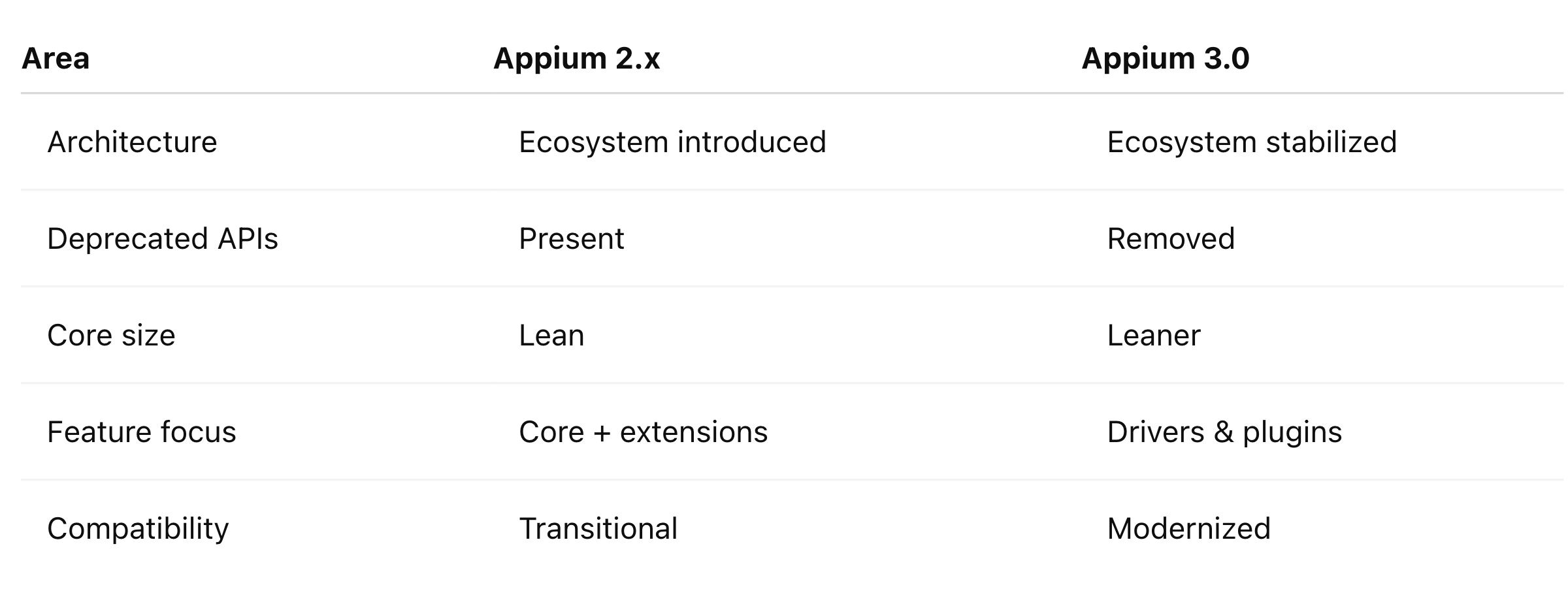
By keeping the core minimal and pushing innovation to drivers and plugins, Appium enables faster evolution, better maintainability, and a healthier open-source ecosystem—while remaining fully compatible with WebDriver standards.
Getting Started with Appium 3
Getting started with Appium 3 is straightforward. Below is a high-level overview of the typical setup process:
- Install Node.js (version 20.19.0 or higher) on your computer
- Install Appium globally by running
npm install -g appiumin your terminal - Install a driver compatible with the target platform (like
appium driver install uiautomator2for Android) - Install a client library for the desired programming language (like WebDriverIO for JavaScript)
- Optionally, install one or more plugins
- Write your first Appium test
- Run your test and watch Appium automate your app
Note: Appium drivers require the corresponding platform toolchains and SDKs to be installed (such as Android SDKs or Xcode for iOS). To help verify your setup, each official Appium driver includes Appium Doctor, a diagnostic tool that checks whether all required dependencies are correctly configured.
For detailed, step-by-step instructions, the Appium documentation provides comprehensive guides and examples in multiple programming languages. The Appium community is also highly supportive — forums, Stack Overflow, and GitHub discussions are excellent resources when you need help troubleshooting or exploring best practices.
Appium Inspector Tool
Appium Inspector is a GUI tool that helps you inspect, explore, and debug the UI of mobile and desktop applications while using Appium. Previously, you had to download it as a separate application. Now, you can install it directly as an Appium plugin with a simple command: appium plugin install inspector.
What Appium Inspector does
- Connects to a running Appium session
- Displays the UI hierarchy of the app (views, elements, attributes)
- Lets you select elements on the screen and inspect their properties
- Generates locators (XPath, accessibility ID, etc.)
- Allows you to record and execute commands interactively
- Helps validate selectors before writing test code
Why it’s useful
- Eliminates guesswork when identifying UI elements
- Speeds up test creation and debugging
- Works across platforms (Android, iOS, Windows, etc.) via their respective drivers
How it fits into Appium’s architecture
- Appium Inspector is not required to run tests
- It acts as a client that talks to the Appium server using the WebDriver protocol
- Uses the same drivers and capabilities as your test code
Typical use cases
- Exploring a new app’s UI structure
- Finding stable locators for automation
- Debugging failing tests
- Learning how Appium interacts with a platform
Understanding Appium Logs
Appium logs are the runtime output generated by the Appium server while it is starting, creating sessions, and executing automation commands. They provide visibility into what Appium is doing behind the scenes and are essential for debugging, troubleshooting, and understanding failures.
What Appium logs contain
- Server lifecycle events (startup, shutdown, session creation)
- Incoming WebDriver commands and responses
- Driver-level actions (e.g., XCUITest, UIAutomator2 interactions)
- Communication with platform tools (ADB, Xcode, simulators/emulators)
- Warnings and errors (timeouts, capability mismatches, crashes)
- Plugin activity, if plugins are enabled
Where Appium logs come from
- Displayed in the terminal/console where the Appium server is running
- Can be redirected to a file for later analysis
- Some clients and CI tools also capture and store them automatically
Why Appium logs are important
- Help identify why a session failed to start
- Reveal locator issues and command errors
- Show driver-specific problems (SDK, device, permissions)
- Useful for CI/CD debugging and flaky test analysis
Common logging levels
- INFO – High-level actions and normal operation
- DEBUG – Detailed command and driver interactions
- WARN – Potential issues that don’t stop execution
- ERROR – Failures that cause tests or sessions to stop
When to check Appium logs
- Tests fail unexpectedly
- A session does not start
- Device or emulator is not detected
- Tests behave differently in CI vs local runs
Appium logs are the primary diagnostic tool for understanding how Appium, its drivers, and the underlying platforms behave during test execution.
Protecting Sensitive Data in Logs
Appium 3.0 (from server version 2.18.0 onward) provides a way to mask sensitive values in logs, such as passwords, tokens, or API keys, to prevent accidental leaks.
- Use the Appium Logger
- Wrap sensitive values with
logger.markSensitive()when logging:
import { logger } from "@appium/support";

this.log.info("Value: %s", logger.markSensitive(value));
- This replaces the actual value with a generic mask in the logs.
- Set the Sensitive Header
- When sending requests that involve sensitive data, include the custom header:
X-Appium-Is-Sensitive: 1
- The value can be
1ortrue(case-insensitive). Without this header, the log value will not be masked.
- Driver/Plugin Support
- This masking works for extensions, drivers, and plugins that use the standard Appium logger.
- It allows conditional masking, depending on which request is being handled.
Benefits
- Prevents accidental exposure of confidential information in server logs.
- Works in combination with standard Appium log filtering.
- Enables safe debugging and CI/CD logging even when sensitive data is involved.
Reference: Appium Official Docs – Masking Sensitive Log Data